
Locking the budget is the moment a job stops being a proposal and starts being something you measure. Understand what it does before you press it, because it is the one action in estimating that is not simply reversible.
What locking actually does
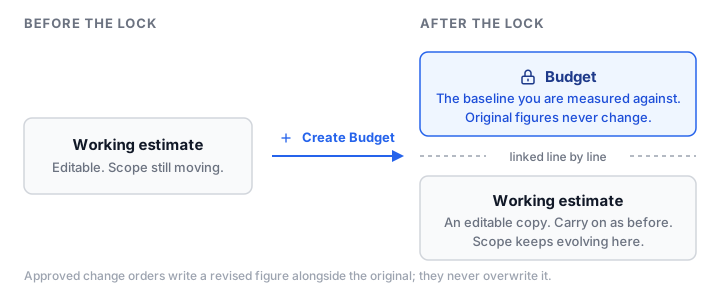
When you create the budget from your estimate, BldrTeam does not freeze your estimate and leave you unable to work. It splits it in two:
- The budget: a snapshot of the numbers at the moment you locked. This is the baseline you will be measured against.
- A new working estimate: an exact copy, still fully editable, linked line by line to its budget counterpart.
From then on you keep working in the working estimate exactly as before. The budget sits underneath as the number you committed to.
Why the budget never changes
Original budget lines are immutable. Not discouraged from being edited; genuinely not editable. If the baseline could drift, variance would be meaningless: every overrun could be erased by quietly raising the budget.
Alongside the original, BldrTeam keeps a second number, the revised figure, and that one moves as the job does. Keeping both means a line tells both stories: what you committed to, and what you now expect it to come in at.
Three ordinary things move the revised figure:
- An approved change order. The client agreed to more scope, or to less.
- Awarding a bid. The sub came in above or below what you had estimated.
- Editing the working estimate after the lock. You refined the number yourself.
Each of those is recorded on its own, with the reason it happened, so a line that has drifted can always be read back: how much moved, and what moved it.
How the projection changes as a line progresses
After the lock, BldrTeam projects a final cost for every budget line, and how it projects depends on how far along that line is.
Not started. The projection is simply the forecast: the budget line as it stands, including any revision an approved change order has made to it.
In progress. What you have incurred so far, plus whichever is larger of what is left of the forecast and what you have committed but not yet been billed for. That second half is deliberately pessimistic: if you have issued a purchase order for more than the forecast had left in it, the projection follows the commitment rather than the number you hoped for.
Complete. What it actually cost, exactly. The forecast stops counting, and no further margin is carried on scope that no longer exists.
The first two states look after themselves: a line sits at not started until an actual cost lands against it, and moves to in progress the moment one does. Nothing ever moves itself to complete. That is always you, on the line, once you know nothing more is coming.
Build the habit, because until a line is marked complete, whatever is unspent in its forecast is still sitting in the projection for the whole job, making it look worse than it is.
Marking complete is not a lock, though. If a late bill lands against a line you had closed off, BldrTeam reopens it rather than leaving the total quietly wrong. A line stays complete only while the cost you completed it on is still the cost.
Scope added after the lock
Lines added to the working estimate after the budget was locked are flagged as such. That keeps two different questions apart:
- Did we estimate the original scope well?
- How much scope grew after we committed?
Both matter, and a builder who cannot separate them cannot tell an estimating problem from a scope-control problem.
When to lock
Lock when the number is one you would sign. Too early and the baseline is noise; too late and there is no baseline to measure the job against while the job is happening.
In practice most builders lock when the contract is signed, which makes the budget and the contract tell the same story.
See budget tracking for what the variance reporting looks like once you are tracking, and building an estimate for the step before this one.